Reviewing items
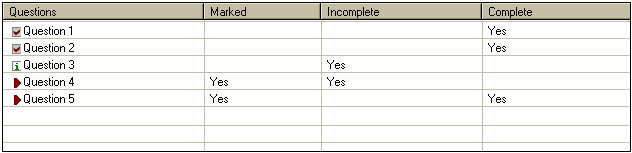
At the end of the examination, you will see a scrollable
listing of all the question numbers. This list displays each question
number and indicates if the question has been marked for review, completed
or skipped.
| To
review questions |
|
Click on the Review All button. You will be moved to
the first question. Clicking on the Next button will
cause you to move to the next question. You can also double-click
on the question number in the list to move to a particular question.
|

|
| To
review marked questions |
|
Click on the Review Marked button. You will be moved
to the first marked question. Clicking on the Next button
will cause you to move to the next marked question. |

|
| To
review incomplete questions |
|
Click on the Review Incomplete button. You will be moved
to the first incomplete question. Clicking on the Next
button will cause you to move to the next incomplete question.
|

|
Click on the 'Next' button to continue.
|